 Keybliq
Keybliq › Key sign-out sheet
Key sign-out sheet: free template and example
A ready-to-print key log for a security desk, front office, school, clinic or warehouse. Download it without signing up, print it, and adapt it to your site.
Updated October 27, 2026
What to include in a key sign-out sheet
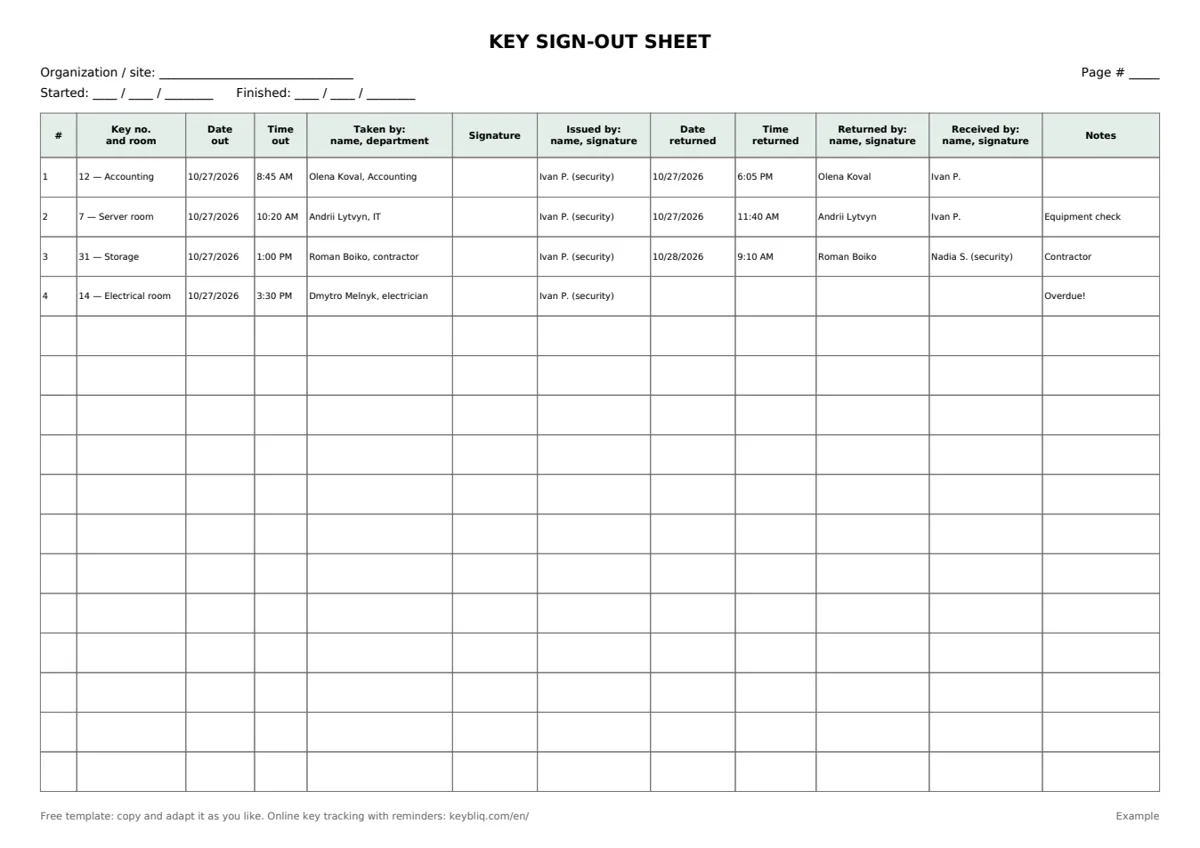
Check-out and return go on the same row, so open rows show at a glance which keys are still out.
| Column | Why it matters |
|---|---|
| Key number and room | Use the number on the key tag. It is faster to find a key by number than by room name. |
| Date and time out | Shows how long the key has been out. |
| Taken by: name, department | Printed clearly, so you can reach the person later. For contractors, add the company name. |
| Signature | Confirms the person actually received the key. |
| Issued by | The security officer or administrator responsible for handing it out. |
| Date and time returned | An empty cell means the key is still out. |
| Returned by and received by | Keys are often brought back by someone else, and received by the next shift. |
| Notes | Contractor, spare copy, damaged tag, “overdue, manager notified”. |
Filled-in example
Key control policy: eight simple rules
- Keep a key register (a separate sheet in the Excel file): key number, room, number of copies, where the spare is kept and who may take it.
- Issue keys only to people on the list. Anyone else needs approval from a responsible person; write down who approved it.
- One row per key. Three keys means three rows, or the returns will not add up.
- Write the time immediately, not from memory at the end of the shift.
- At the end of each shift, check for open rows and hand the list of keys still out to the next shift.
- Number the pages so no page can be removed unnoticed.
- Store spare keys separately, in a safe or a sealed key cabinet. Issuing a spare is a log entry too.
- Record a lost key right away and decide whether the lock needs to be changed.
When a paper key log is no longer enough
A paper sheet works while you have a few dozen keys and one desk that hands them out. After that, the same problems appear:
- to find out who has a key, someone has to flip through pages looking for an open row;
- nobody is reminded that a key was not returned; it gets noticed the next morning;
- handwriting is hard to read, and monthly reports are compiled by hand;
- the log stays at the desk, so managers can’t see it.
In Keybliq, the same columns fill themselves. An employee requests a key in a Telegram bot, security confirms with one tap, and the time and names are recorded automatically. You always see who has each key right now, and the system sends reminders about overdue keys. The Business plan and above add a web panel for the security desk and Excel export of the log.
Try key tracking software on your own keys
14-day free trial, no credit card. Setup takes about 5 minutes, no hardware needed.
Questions
Is this key sign-out sheet really free?
Yes. No sign-up, no email. Copy it, add your logo, change the columns and print as many as you need.
What is the difference between a key log and a key register?
A key register lists every key you own: number, room, number of copies, where the spare is kept and who may take it. A key log (sign-out sheet) records each time a key leaves and comes back. The Excel file includes both.
Can I keep the key log in Excel?
You can, but a spreadsheet has no signatures and any row can be changed after the fact. Key tracking software records the time and who issued the key automatically.
How long should we keep completed sheets?
Follow your organization’s records retention policy or your insurer’s requirements.